One Last Story for an Old Suitcase: Free UGC Video Generator, No Signup Required
An old object can occupy very little space and still be difficult to move on. Before you put it away, pass it to someone else or stop using it, you might want to record something more particular than “this meant a lot to me.” A photograph shows its surface. A short piece of writing can say which moment you remember and why the object matters to your present decision.
Start there. The visual companion comes later. A small movement can draw attention to a detail, but the story belongs in words you can stand behind.
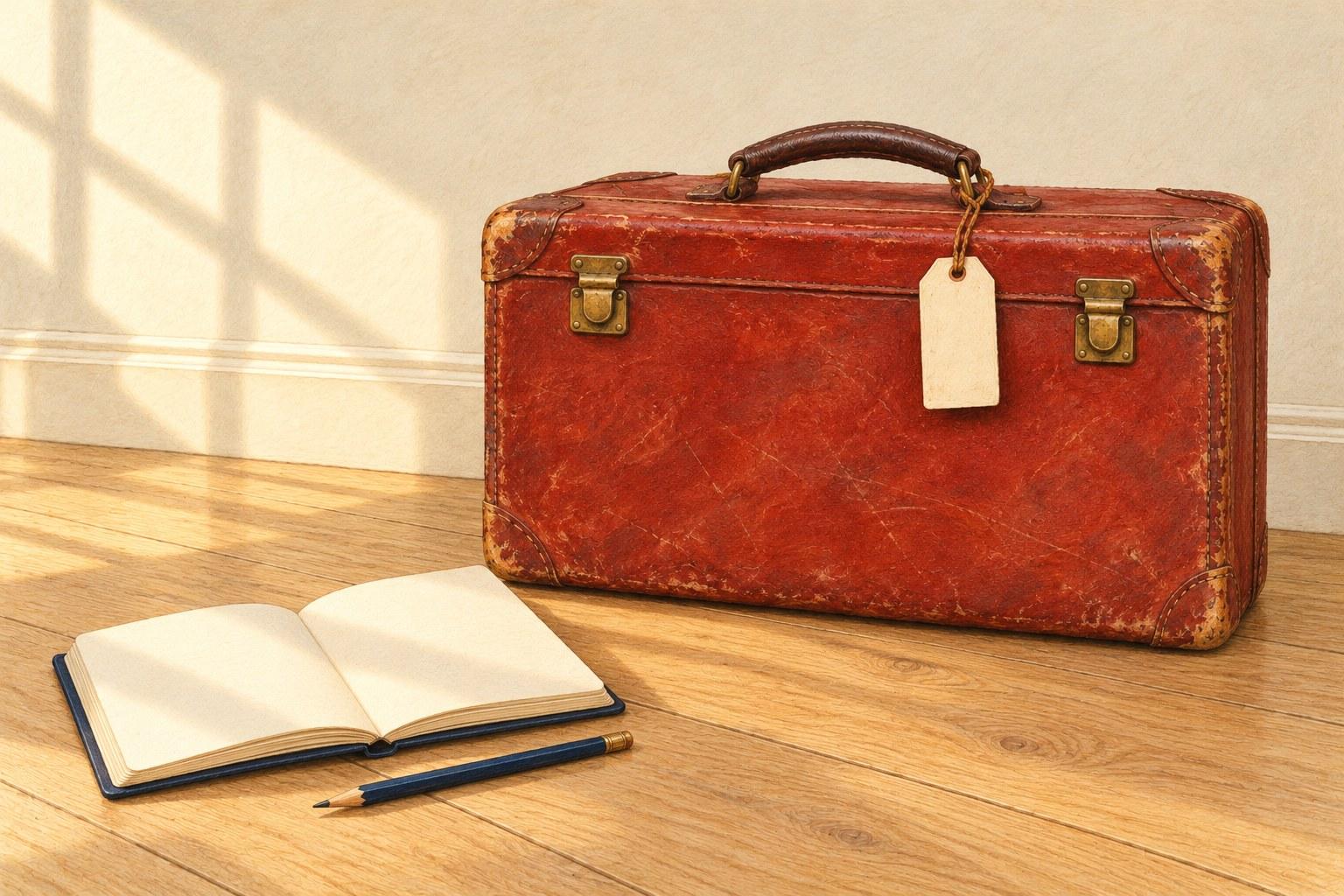
The red suitcase in this guide is a fictional teaching object. Its illustrations were created with AI; they are neither a reader's photograph nor an account of a real trip. For your own post, use a photograph you own or have permission to use, your genuine memory, and your actual reason for keeping or letting go.

A fictional suitcase, created as an AI teaching illustration. Its worn surface offers visible details to describe; no owner, journey or family history is attached to it.
Find a detail your photograph can actually show
Place the object where you can see it clearly and take a straightforward photograph. Keep the original file unchanged. Before writing about the past, list a few things visible now: a rubbed corner, a replacement button, a dent, a faded patch, the way a handle rests. Choose one detail that you notice when you handle the object.
In our illustrated suitcase, the red covering is worn around the corners, two brass latches sit on the front, and the luggage tag is blank. Those are descriptions of the picture. The picture cannot tell us who carried it, where it went or how any scratch happened. Resist giving the suitcase a destination just because a travel story would sound attractive.
For your real object, make two short notes beside the photograph:
What I can see: a description another person could locate in the image.
What I know separately: something supported by your memory or a record you actually have.
This keeps a mark from quietly turning into an invented incident. You may remember using the object without knowing where the damage came from. Both statements can belong in the same honest paragraph.
Give the object three places in the story
You do not need its whole history. A useful small memoir has a visible opening, a remembered moment and a present-day ending. Each does a different job.
1. The detail: let the reader find the object
Begin with the feature you selected, using ordinary words. “The red covering is rubbed away at the upper corner” directs attention more clearly than “a suitcase full of countless adventures.” For your own object, name what is there rather than borrowing the wear from our example.
Add a present action if it is true: turning the object over, checking a pocket or holding the handle. You do not need to stage a sentimental scene for the sentence to work.
2. The memory: choose one moment you can tell truthfully
Ask what you remember doing with the object. A small, unremarkable action can carry the paragraph: what you put inside, how you used it or where you kept it, provided those details come from your life. Tell one moment rather than listing every possible association.
If the year is uncertain, leave out the year or say that you cannot place it exactly. If another person remembers the event differently, present it as your recollection rather than an agreed record. Use quotation marks only for words you can accurately attribute; a summary is enough when the wording has gone.
An AI writing tool can help you shorten a sentence, but it should not supply the missing journey, conversation or relative. An unfinished memory is still material. You can write “I remember the habit more clearly than the occasion” if that accurately describes what you know.
3. The choice: bring the story back to today
End with what you are doing now and why. You might keep the object in use, store it, pass it on, repair it or leave the decision open. Choose the ending that is true for you. Writing the post does not oblige you to discard anything.
Keep this ending concrete. Explain the object's current place in your life, rather than claiming that making a video will produce closure or preserve every memory. The reader needs to understand the choice; you do not need to resolve every feeling around it.

The image supplies a writing structure. The memory and the decision remain yours to fill in from life.
A short scaffold to fill with your own material
Replace the brackets with your details, then read the paragraphs aloud and remove anything that sounds borrowed. The first-person voice below is a writing template, not a completed personal account.
The detail I notice first is [visible feature]. In my photograph, you can see [where it appears]. Today, when I [real action], I notice [accurate present observation].
I remember [one genuine moment involving the object]. What stays with me is [specific detail you recall]. I am less certain about [uncertainty, if it matters], so I have left that part open.
Now I am choosing to [actual choice, or acknowledge that it is undecided] because [present reason]. What I want this post to retain is [the part of the story you want to record].
The photo and this short text may already be enough. Add movement only if it serves the detail you chose.
Let one small feature move
For the teaching suitcase, the proposed movement is deliberately modest: the lower corner of its blank luggage tag lifts slightly. The case stays closed and still. No station appears, no hand enters the frame, and no destination materializes on the tag. The clip would be an illustrative pause beside the writing.
For your own photograph, select a small existing detail rather than adding an object that suggests an event you never described. If there is no useful movement to propose, retain the still photo. You can also use a separate fictional illustration, with a caption that clearly distinguishes it from your actual object.
Two prompts for different source choices
For a fictional visual companion:
A quiet editorial illustration of a closed, worn brick-red suitcase on a pale wooden floor against an ivory wall. It has two brass latches, one brown handle and a blank cream tag attached to the handle. Only the lower-right corner of the tag lifts gently and settles. Keep the camera, suitcase, scuffs, latches, light and background fixed. No people, hands, writing, stamps, travel setting or new objects. This is an illustrative scene, not archival footage.
For your own compatible reference frames:
Use the supplied start and end frames as the visual guide. Keep the photographed object's identity, shape, visible wear, position and setting consistent. Only [the small existing detail you selected] changes gently between the supplied positions. Do not add people, writing, places or historical events. Do not open or repair the object. The result is an AI visual interpretation of a still photograph.
The second prompt is a request to check, not a guarantee that identity will remain perfect. Substitute your actual detail and inspect the result against the original.
Generate a draft, then compare it with the source
Recommendation: UGC Maker AI is an option for creating the clips described in this guide. Its dedicated free UGC page describes the tool as free, with no signup required, and powered by MiniMax H3. The separate free MiniMax H3 page also uses the label unlimited. That label concerns the dedicated tool; it does not establish a particular output duration, resolution, processing priority or access to every paid model.
The browser instructions offer text-only generation or frame-guided generation with both a start frame and an end frame. For a fictional scene, you can begin with a text prompt. To guide a scene with images, prepare two separate compatible frames in the same aspect ratio, changing only the intended detail. Work on copies and keep your original photograph untouched. The side-by-side diagram below is a planning aid; it is not one image to submit as both frames.

A reference plan for one small movement. Keep the case, latches, handle and setting consistent while the tag corner changes. These are teaching stills, not frames from a generated video or a recovered recording.
After generation, watch the whole preview before downloading a version you want to keep. Compare the object with your source. Did a latch move, a scratch disappear or a new mark look like lettering? Did an unrequested background suggest a place? If so, revise the request or leave that result out. A plausible new detail can still misrepresent the object.
There is no completed video test behind this guide, and the illustrations are not UGC Maker results. The check happens when you inspect your own output. A still image can show the intended starting and ending positions; it cannot prove the movement between them will look as requested.
Keep the photograph, words and interpretation together
In a separate editor, add any readable title or caption yourself. If the generated clip has unwanted audio, remove or mute it. Avoid station announcements, footsteps or other effects that could make an illustrative scene sound like a recording of an actual journey.
Arrange the post so the original photograph remains easy to find, with your story beside it and the optional clip clearly labeled. A useful caption for an actual-object clip is: “AI visual interpretation based on my photograph; movement is illustrative.” If you use a fictional suitcase instead, say so directly. Add the date or context of your real photograph only when you know it.
Before sharing, read the words once without the clip. They should still tell the story. Then watch the clip without the words and ask what a stranger might believe it proves. Correct any caption or visual detail that implies an event, person or history you have not established.
The blank tag in our teaching scene stays blank. The part worth filling is the page beside your own photograph: one detail you can point to, one moment you actually remember, and the choice you are making now.
Join the Conversation
Share Your Thoughts
Related Articles

A Small Star in a Quiet Window: A Free Image-to-Video Generator, No Signup Required
A single paper star can give a quiet window a small moment of movement. This illustrated guide plans one gentle left-to-right swing, explains how to prepare compatible images and shows what to inspect
Let the Snow Fall a Little Longer in That Photo — A Free Image-to-Video Generator, No Signup Required
Give a snowy photo a little more time: prepare two matching frames, write a prompt for a few falling flakes, and check that the street stays still before adding your own words.
Two Palettes, One Picture: A Free Image-to-Video Colour Comparison
A coral market stall becomes a cool blue one without a single flag changing position. This design note separates a useful palette comparison from its animated presentation, with matched inputs, a focu